Control PS-5 Download for free
Free, no sign-upDownload Control PS-5 for your Switch

The app installs the driver, pairs the controller and unlocks the DualSense features.

Download the app
For hacked Nintendo Switch consoles

Connect the PS5 controller to the Nintendo Switch.

The Switch does not recognize the DualSense on its own. On a hacked Switch, Control PS-5 installs the driver with one tap and the controller pairs over Bluetooth, with adaptive triggers, light bar and per-game profiles.

  • 100% free app
  • Bluetooth, no adapter
  • DualSense and DualSense Edge
Dat Zero Games Not hacked yet? At Dat Zero Games it is done while you wait, and the Switch leaves with the app installed.
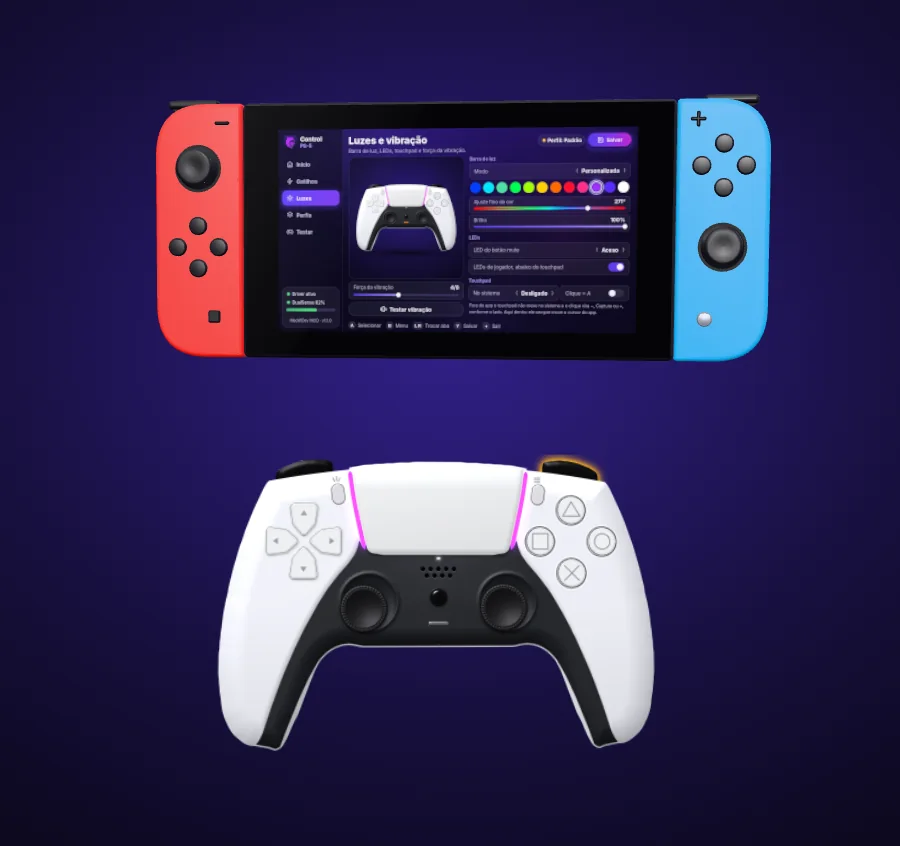
Nintendo Switch with the Control PS-5 app on screen and a white PS5 controller connected, with the light bar on
Choose the light bar color
R2 trigger effect: see where it resists
releasedfully pressed

The colors and effects are the app's. Drag to move the scene.

The short answer

Can you use the PS5 controller on the Switch?

Yes, but the stock Switch does not accept the DualSense on its own. See what changes in each case.

FeatureStock SwitchWith a USB adapterHacked, with Control PS-5
Connects the DualSenseNoYes, through the adapterYes, directly over Bluetooth
Adaptive triggersNoUsually notYes, on L2 and R2
Light bar and LEDsNoDepends on the adapterYes, 12 colors and fine-tuning
Touchpad as cursorNoUsually notYes, even on the HOME menu
Per-game profileNoNoYes, automatic
CostNot applicableBuying the adapterFree app
Requires hackingNoNoYes
Step by step

How to connect the PS5 controller to the Nintendo Switch

Scroll the page and follow the animation. The screens shown on the console are the app's own.

Loading the 3D model
1

Put the app on the SD card

First, make a copy of the atmosphere/contents/010000000000bd00 folder on the card, to be safe. Then download the app and unzip it.

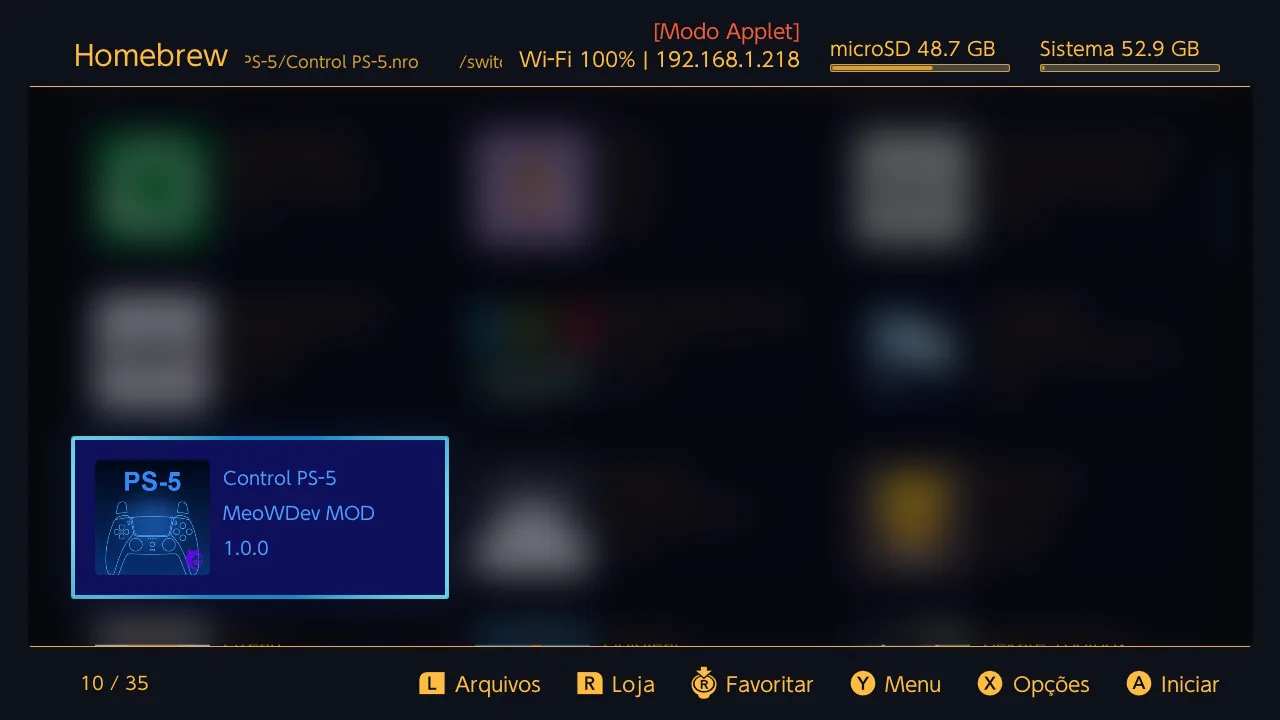
  1. In the CNX pack, hold R and open the Album to enter the Homebrew menu.
  2. Open DBI, start the MTP connection and plug the USB cable into the computer.
  3. On the computer, open Switch, then 1: SD Card and the switch folder.
  4. Copy the unzipped Control PS-5 folder there.

Prefer no cable? Put the SD card in the computer, copy the folder into switch and put the card back in the Switch.

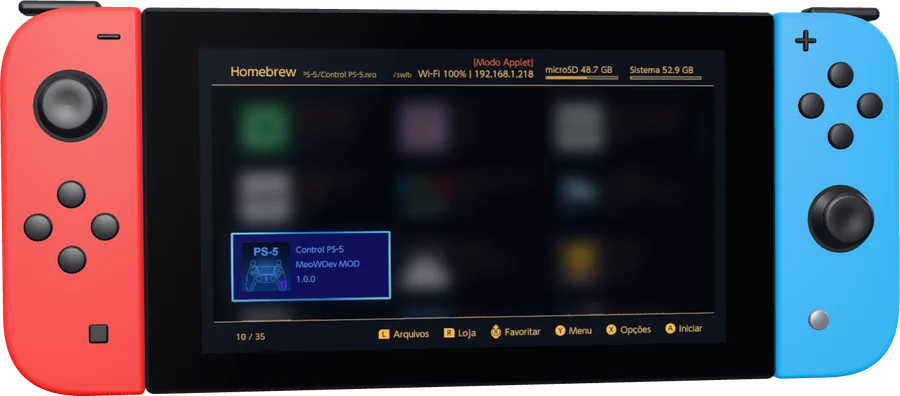
Nintendo Switch Homebrew menu with the Control PS-5 app in the list
2

Open the app and install the driver

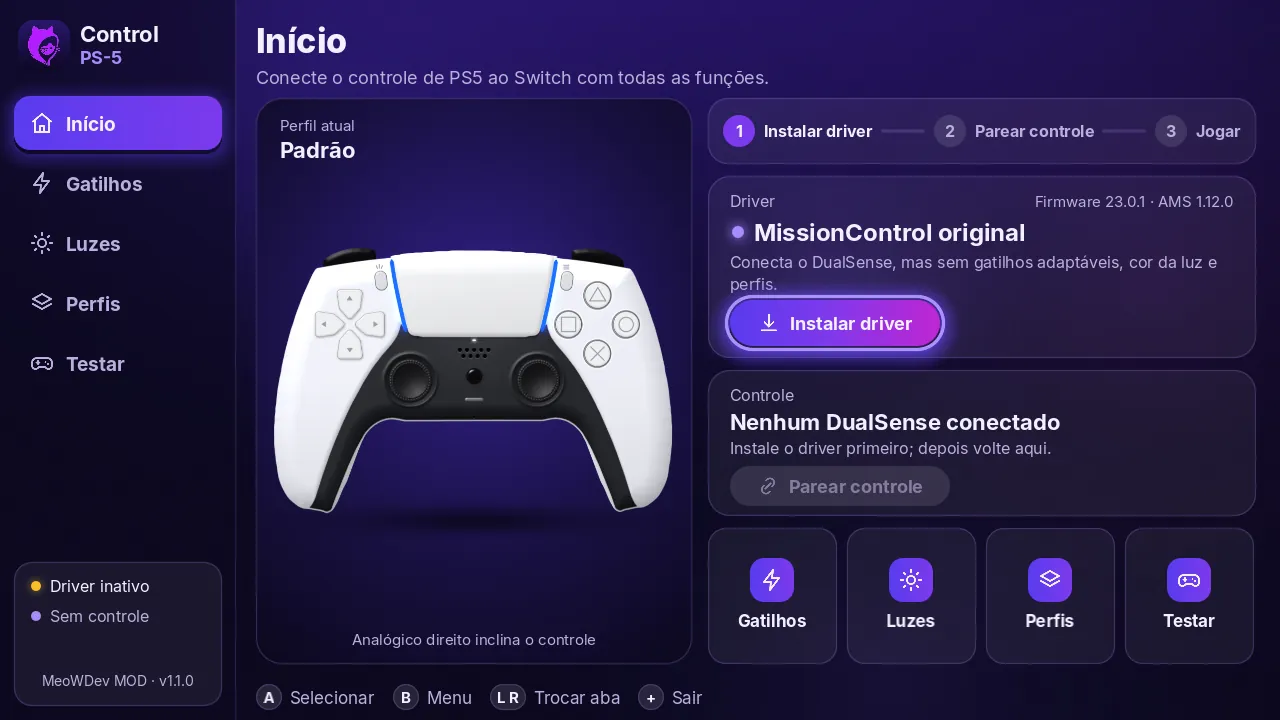
Leave DBI and go back to the Homebrew menu (R + Album). Open Control PS-5 and, on the Home screen, tap the purple Install driver button. When it finishes, the app asks you to restart the Switch.

Control PS-5 Home screen with the purple button to install the DualSense driver
3

Tap Pair controller

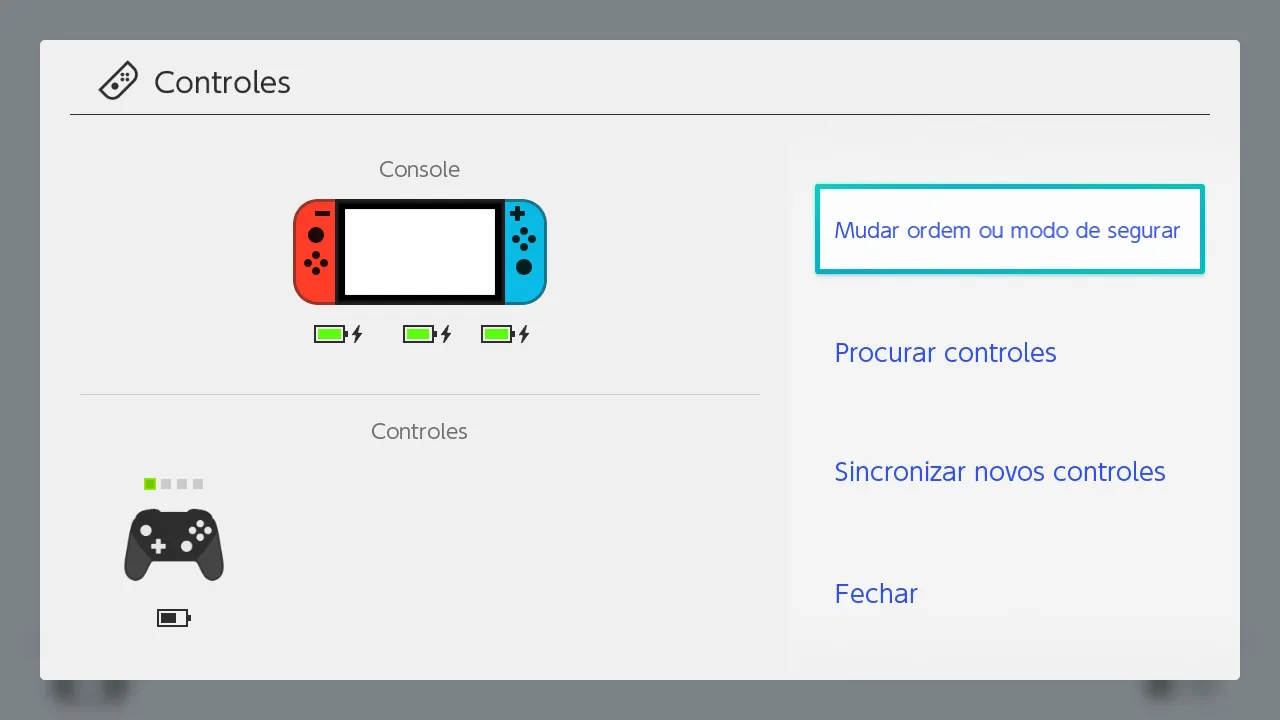
With the Switch back on, open Control PS-5 again. Tap Pair controller and, on the Controllers screen that opens, choose Change Grip/Order.

Nintendo Switch Controllers screen with the Change Grip/Order option
4

Hold Create and PS

On the PS5 controller, hold Create and PS until the light bars start blinking. That is how the DualSense enters pairing mode.

5

Press L1 and R1 together

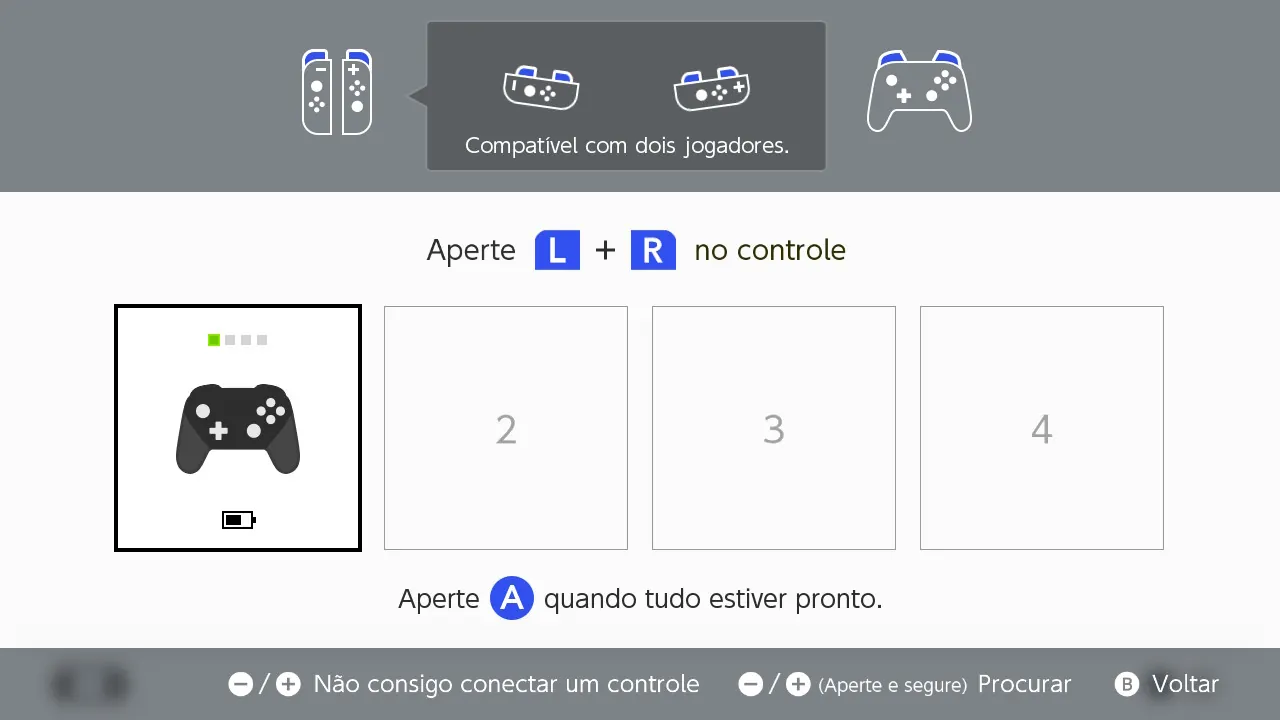
On the Press L + R screen, press L1 and R1 together. When it syncs, a black controller appears on screen and the light bars stay on, without blinking.

Switch screen asking to press L and R, with the PS5 controller synced as player 1
6

Done: set it up your way

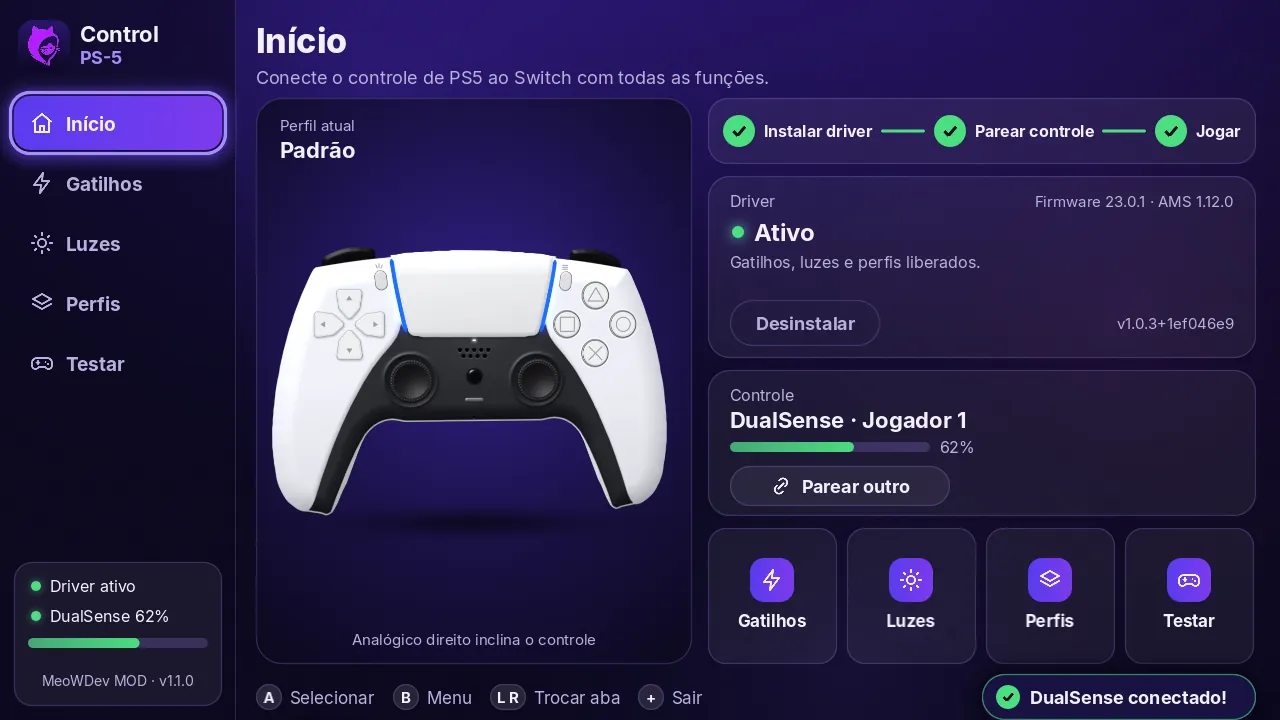
Go back to the app and adjust triggers, lights and profiles. The controller shows as DualSense, Player 1 and the driver as Active.

Control PS-5 Home screen with the driver active and the DualSense connected as player 1
Features

What Control PS-5 unlocks on the DualSense

Everything is set up inside the Switch, without moving folders or editing files.

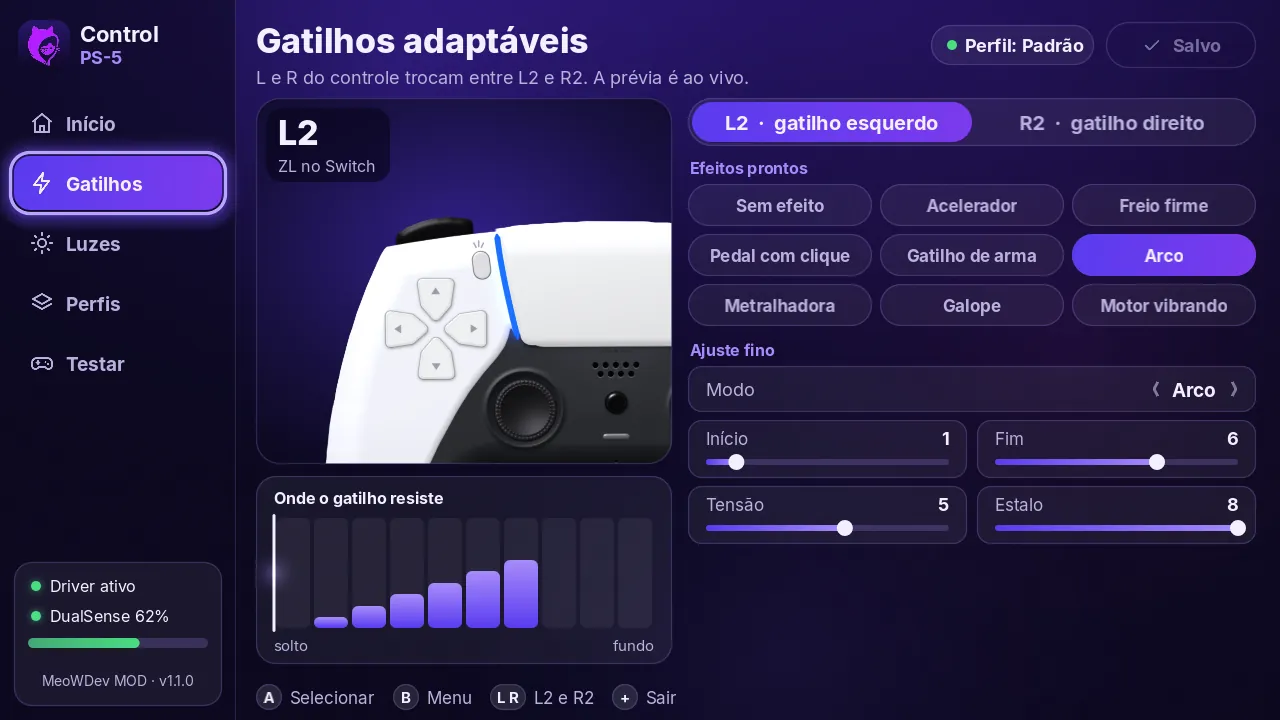
Adaptive triggers on L2 and R2

Resistance, gun click, bow, vibration and machine gun. Each trigger has ready-made effects and fine-tuning of start, end and strength.

Control PS-5 Adaptive triggers screen with the L2 and R2 settings

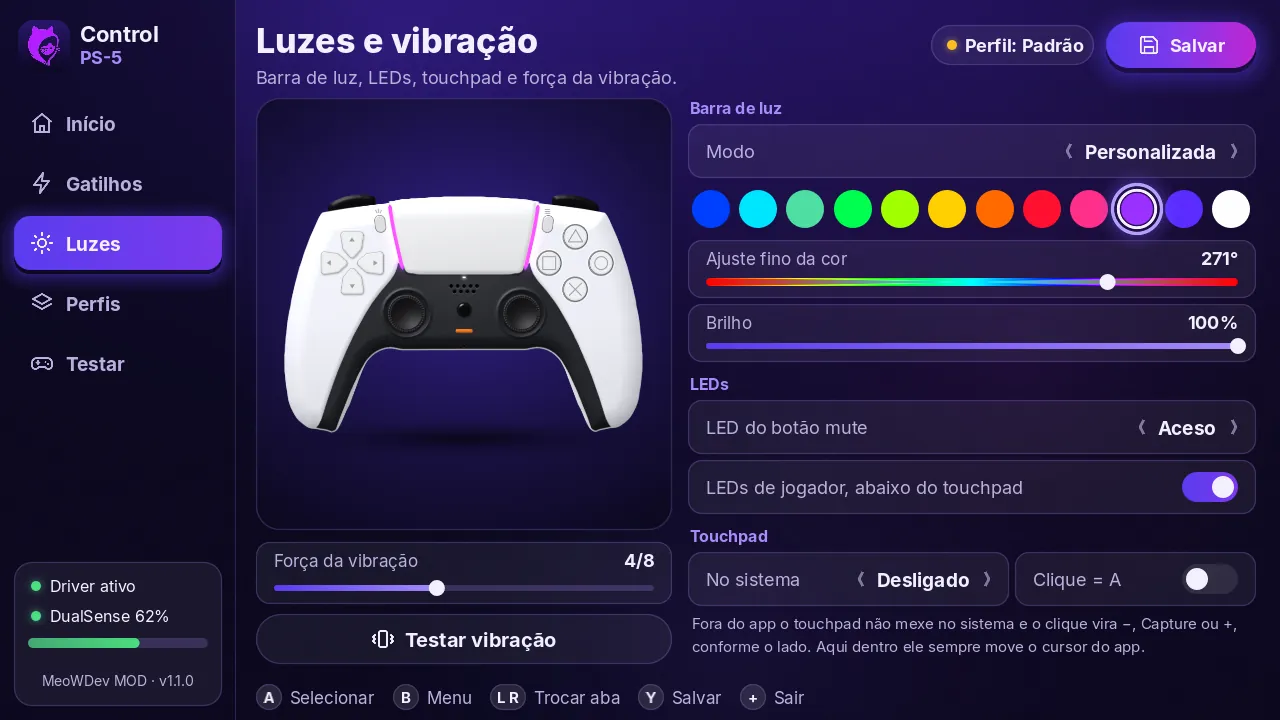
Light bar and LEDs

Twelve quick colors, fine-tuning, brightness, mute button LED and player LEDs. The preview shows on the controller right away.

Control PS-5 Lights and vibration screen with the light bar colors

Automatic per-game profile

Set it up once. When the game opens, its profile is applied by itself; the others use the default.

One-tap installation

The app installs, updates and uninstalls the driver, and keeps a backup of the MissionControl you already had.

Guided pairing

Shows the steps on a drawing of the controller and opens the Switch Controllers screen so you can pair another one.

Controller test

Buttons, sticks, gyroscope, battery and touchpad, live. You can even test PS and mute: on the Test tab they do not take you off the screen.

Touchpad as cursor, for a broken touchscreen

Your finger moves a little hand with a purple glow and the click taps where it is, even on the HOME menu. A lifesaver if your Switch touchscreen is broken. It also works as a direct touchscreen.

How it looks on the Switch

The Control PS-5 screens on the Nintendo Switch

Tap a screen to see it bigger.

Driver active and DualSense connected.
Adaptive triggers on L2 and R2.
Light bar, LEDs and vibration.
Control PS-5 in the Homebrew menu.
Installing the driver.
Controller synced as player 1.
Your Switch is not hacked yet?

Get it unlocked at Dat Zero and leave with the app installed

The unlocking is done while you wait, with a modchip, and you follow the whole process. The Switch leaves with the app in the Homebrew menu: just pair the controller.

  • Done while you wait, with you watching
  • Control PS-5 already installed in Homebrew
  • 1-year warranty
  • Pioneer store, with more than 3,000 consoles
  • For the Switch 1, any model
Before installing

What you need to know

Compatibility

Switch 1 hacked with Atmosphère (CNX pack). Requires firmware 23.0.1 and Atmosphère 1.12.0, the versions the driver was built and tested on. Works with the DualSense and DualSense Edge.

Limits

The game sound does not come out of the controller speaker, because the Switch does not send audio to controllers. Trigger effects are set per profile: the game does not know they exist.

New firmware and undoing

The app checks the firmware before installing and refuses when it is newer than supported, so the boot does not hang. To go back, tap Uninstall: it restores the original MissionControl.

Use at your own risk. Modifying the console may void the factory warranty, and using a modified console online carries a ban risk. Keep a backup of the SD card. The app does not enable piracy.

FAQ

Frequently asked questions about the PS5 controller on the Switch

How do I connect the PS5 controller to the Nintendo Switch?

On a hacked Switch, copy the free Control PS-5 app to the SD card, install the driver from the app and restart. Then tap Pair controller, hold Create and PS until the light bars blink and press L1 and R1 together on the Press L + R screen.

Can I use the PS5 controller on the Switch without hacking it?

Not with this app. The stock Switch does not recognize the DualSense over Bluetooth, and Control PS-5 needs a hacked Switch with Atmosphère. Without hacking it, the way is a third-party USB adapter, which usually treats the DualSense as a regular controller.

Do I need an adapter to use the PS5 controller on the Switch?

With Control PS-5, no: on a hacked Switch, the DualSense pairs directly over Bluetooth. Without hacking it, you need a third-party Bluetooth adapter, such as those from 8BitDo, which usually treats the DualSense as a regular controller.

Is Control PS-5 free?

Yes. The download and all features are free, and anyone who wants to can support the project with a Pix of any amount.

Does Control PS-5 have anything to do with piracy?

No. The app only connects the PS5 controller to the Switch: it does not include, download or install games, and it does not touch any game's protection. Hacking is needed because the stock system does not accept the controller.

How do I put the PS5 controller in pairing mode?

Hold the Create and PS buttons at the same time until the light bars around the touchpad start blinking.

Do the adaptive triggers work on the Switch?

Yes, with Control PS-5. You choose the L2 and R2 effect in the app, such as resistance, gun click, bow, vibration or machine gun. The effects are per profile: the game does not know they exist.

Does it work with the DualSense Edge?

Yes. The app works with the DualSense and the DualSense Edge.

The Switch touchscreen does not work. Can I use the controller touchpad?

Yes, on a hacked Switch. In the app, open Lights, choose Cursor mode under Touchpad, save with Y and open the Control PS-5 Pointer overlay through Tesla or Ultrahand (L + ↓ + R3). Your finger moves a little hand and the click taps where it is, even on the HOME menu. The screen is still broken: the touchpad just does its job.

Does it work on the Switch OLED?

Yes. The app is for the Switch 1 hacked with Atmosphère and was tested on a Switch OLED. The Switch 2 is not compatible.

Which firmware and which Atmosphère version do I need?

Firmware 23.0.1 and Atmosphère 1.12.0, the versions the driver was built and tested on. The app checks the firmware before installing and refuses when it is newer than supported, so the console's boot does not hang.

Does the game sound come out of the controller speaker?

No. The Switch does not send audio to controllers, so the DualSense speaker does not play the game sound.

Does it work on the Nintendo Switch 2?

No. Control PS-5 is for the hacked Switch 1, and the Switch 2 cannot be hacked.

Something went wrong. How do I undo it?

Open the app and tap Uninstall: it restores the original MissionControl. If the app does not open, delete the atmosphere/contents/010000000000bd00 folder and paste back your backup.

Where can I get my Nintendo Switch hacked?

At Dat Zero Games, in Piedade, Rio de Janeiro, Brazil. The unlocking is done while you wait, with a modchip, you follow the whole process and the Switch leaves with Control PS-5 already installed in the Homebrew menu. WhatsApp: +55 21 98607-0618.


Your DualSense ready for the Switch

Control PS-5 is free. Like it? A Pix of any amount (Brazilian instant payment) helps keep updates coming when new firmware comes out.

Download for free

Another project of ours

Meet PS-5 Controle Test

Test and calibrate the PS5 controller: buttons, sticks, drift, triggers and vibration. Free in the computer browser. On the phone, the Android app has 2 free days.

Learn about the project
Download for free Unlock